This free profit margin calculator shows your profit, margin and markup from cost and selling price, and tells you what price to charge for the margin you want.

From PKR 2,500/mo · USD $10/mo
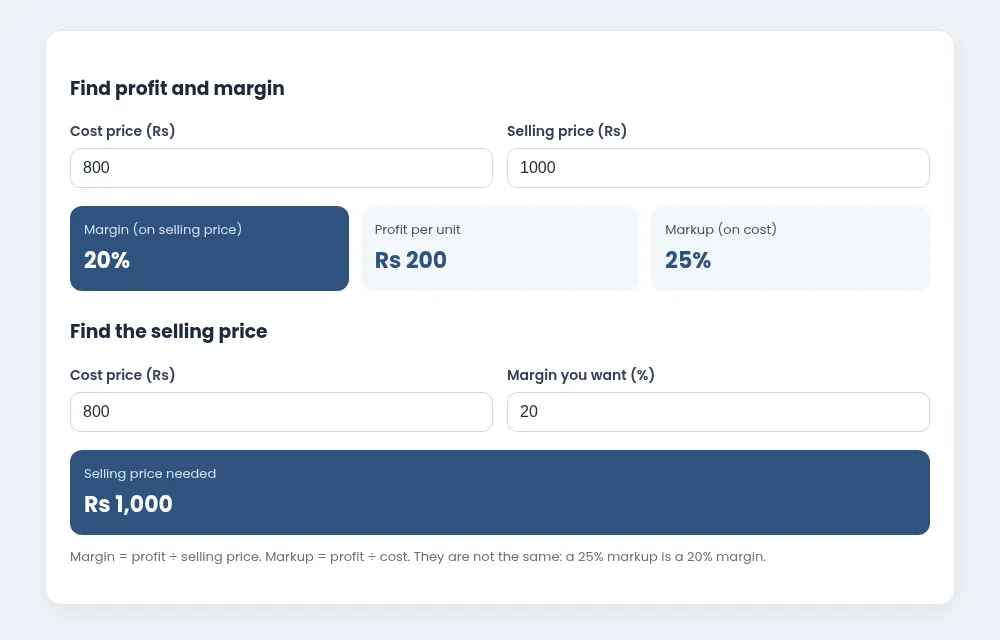
Enter your cost and selling price, or your cost and the margin you want.
Margin = profit ÷ selling price. Markup = profit ÷ cost. They are not the same: a 25% markup is a 20% margin.
Make a clean bill or invoice and print it or save it as PDF.
Monthly instalment, profit and a full payment schedule.
Add or remove sales tax at 18% or any rate you enter.
See profit by day and by item, using real cost prices.
They sound similar but give different numbers:
Example: cost Rs 800, price Rs 1,000 → profit Rs 200, margin 20%, markup 25%. If you add 20% to cost, you get Rs 960 and only a 16.7% margin.
Different categories carry different margins. Packaged groceries often run on thin margins while accessories and loose items can carry more. Check the margin on your top sellers first; a small price change on a fast mover matters more than a big change on a slow one.
Remember to use your real cost, including transport or loading charges. Prices from suppliers change, so recheck margins after each purchase. Our stock management tips cover reorder and pricing basics.
theDukanPOS records cost prices from your purchases and shows profit in reports, so you do not have to calculate each item by hand. See all free tools.
It varies by category. Compare margins within the same category and focus on your best sellers.
No. Margin is profit divided by selling price; markup is profit divided by cost.
No. Use the sales tax calculator separately if your prices include tax.
Try every feature free for 15 days. Questions? Call or WhatsApp 0312 7032292 and talk to a real person.
