Use this free installment calculator for Pakistan to work out a qist plan in seconds: monthly instalment, profit and total payable, with a month-by-month schedule you can show your customer.
From PKR 2,500/mo · USD $10/mo
Tap a mobile phone or motorbike preset, or enter the product price, advance (down payment), your markup and the number of months.
Download PDF opens your print window: choose “Save as PDF”. CSV opens in Excel or Google Sheets.
Flat markup on the financed amount, as most qist businesses charge. Figures are estimates; round as you prefer.
Make a clean bill or invoice and print it or save it as PDF.
Margin, markup and the selling price you need.
Add or remove sales tax at 18% or any rate you enter.
Plans, monthly collections and overdue lists in one place.
Most installment businesses in Pakistan charge a flat markup on the amount financed:
Example: Rs 60,000 fridge, Rs 10,000 advance, 20% markup, 10 months → Rs 50,000 financed, Rs 10,000 profit, Rs 6,000 per month.
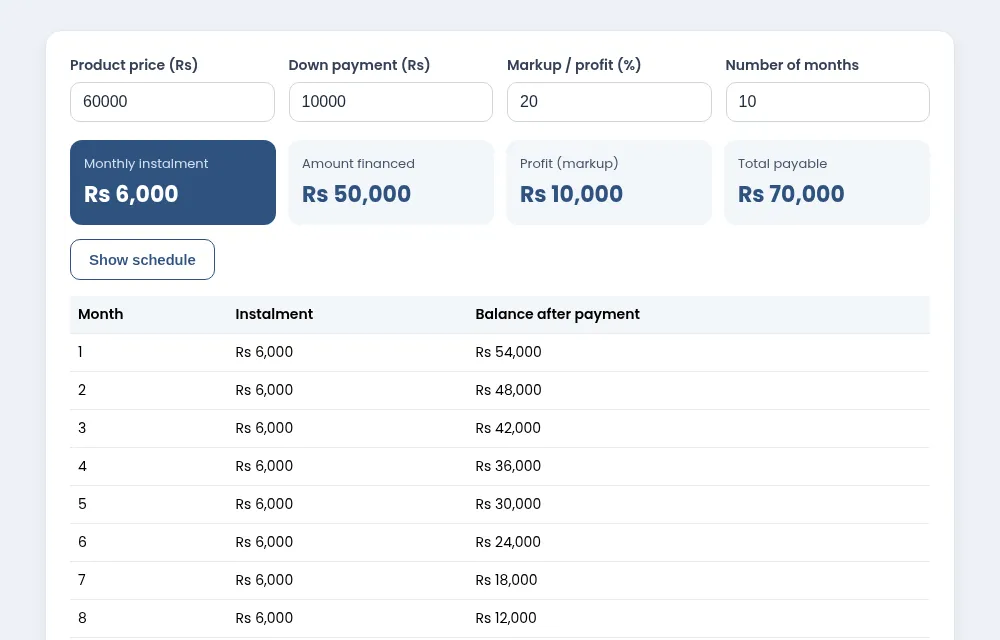
Show the customer the schedule before they sign, so the monthly amount and total are clear. Many shops round the instalment up to the nearest hundred and adjust the last month; the schedule above rounds up to the nearest rupee and puts any difference in the final month.
If your business uses a different method, such as a profit rate per month, convert it to a total markup percentage first. Write the agreed figures into your qist agreement.
Tracking dozens of plans on paper is hard. theDukanPOS has an Installments (Qist) add-on for plans, collections and overdue lists; read how to manage a qist business for practical tips, or see all free tools.
Yes, it is free and needs no sign-up.
It uses a flat markup on the amount financed, the method most qist shops use.
Yes. Show the schedule and use your browser’s print option.
No. It is a calculator for estimates; check the figures you agree with customers.
Yes. Tap Mobile phone or Motorbike above the form to load example figures, then change the price, advance, markup and months to match your own offer.
Price minus advance gives the amount financed. The markup percentage is added to it, and the total is divided by the number of months. The last instalment adjusts for rounding.
Try every feature free for 15 days. Questions? Call or WhatsApp 0312 7032292 and talk to a real person.
