This guide explains how to use POS software in a Pakistani shop, from what to prepare before you start to your first week of billing with theDukanPOS. You do not need to enter everything on day one.
From PKR 2,500/mo · USD $10/mo
Sign up for the 15-day trial and add your shop details.
Start with your top-selling items: name, sale price, cost price and opening stock.
Use existing product barcodes, or print labels for loose items.
Add regular udhaar customers with their opening balances.
Sell, print the bill, and watch stock update.
Our team helps with setup on WhatsApp.
Ten minutes of preparation makes setup much faster. Have these ready:
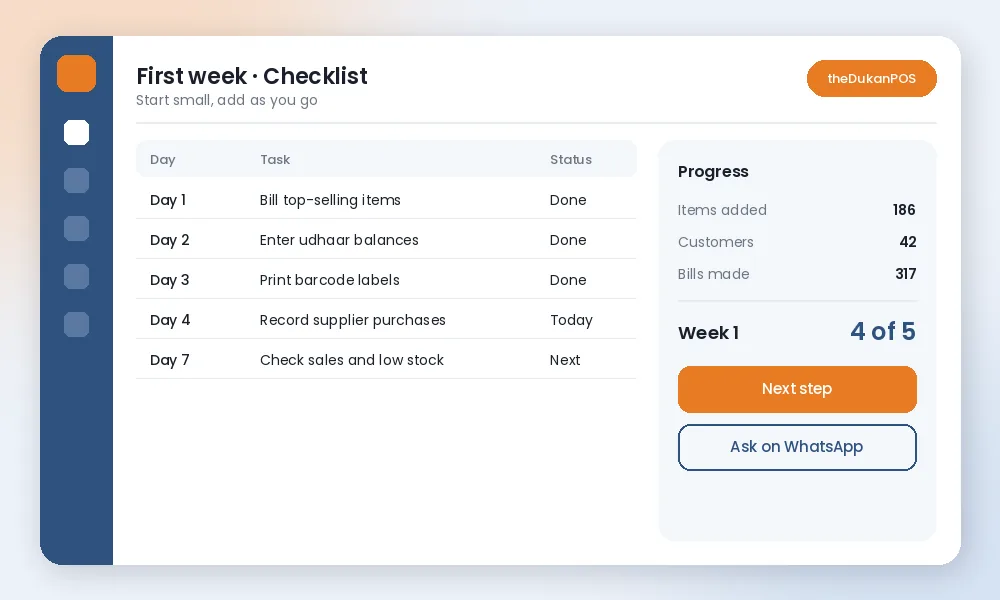
Do not wait until every item is entered. Bill your fast-moving items in the POS and keep writing rare items by hand for a few days. Add each missing item the first time it sells.
Enter each credit customer’s current balance once. From then on, every credit bill adds to their balance automatically, and payments reduce it. See khata.
When stock arrives, enter the purchase so stock and cost prices stay correct. See purchases and suppliers.
Look at daily sales, best sellers and low stock. If numbers look wrong, it is usually an opening stock or price that needs fixing. Our stock management tips help here.
Counter staff can work in Urdu. Show them how to search an item, scan a barcode, choose cash or khata, and print the bill. Most people learn the billing screen in a day.
It depends on how many items you have. Most shops start billing their best sellers on the first day and add the rest over the first week.
No. You can search items by name. A scanner makes billing faster for packaged goods.
Yes. theDukanPOS has a mobile app and also works in a browser.
Message us on WhatsApp at +92 312 7032292.
Try every feature free for 15 days. Questions? Call or WhatsApp 0312 7032292 and talk to a real person.
