Make barcode labels for your shop in a minute with this free barcode generator. Enter a product code, name and price, choose Code 128, EAN-13, UPC-A or QR code, pick an A4 label sheet and download a print-ready PDF or PNG. No signup needed, and there is an Urdu version too.
From PKR 2,500/mo · USD $10/mo
Choose a barcode type and label sheet, then add your products. The preview updates as you type. Click “Download PDF” for a print-ready A4 sheet, or “Download PNG” for single labels.
Tip: the ↻ button makes an in-store code (EAN-13 codes start with 20) that will not clash with branded products. EAN-13 and UPC-A check digits are added for you.
Everything runs in your browser; nothing is saved or sent. Print one test page on plain paper and hold it against your sticker sheet before printing on labels. Print at 100% (Actual size), not “Fit to page”.
Most small shops print in-store barcodes for loose, unbranded or self-packed items. The quickest way:
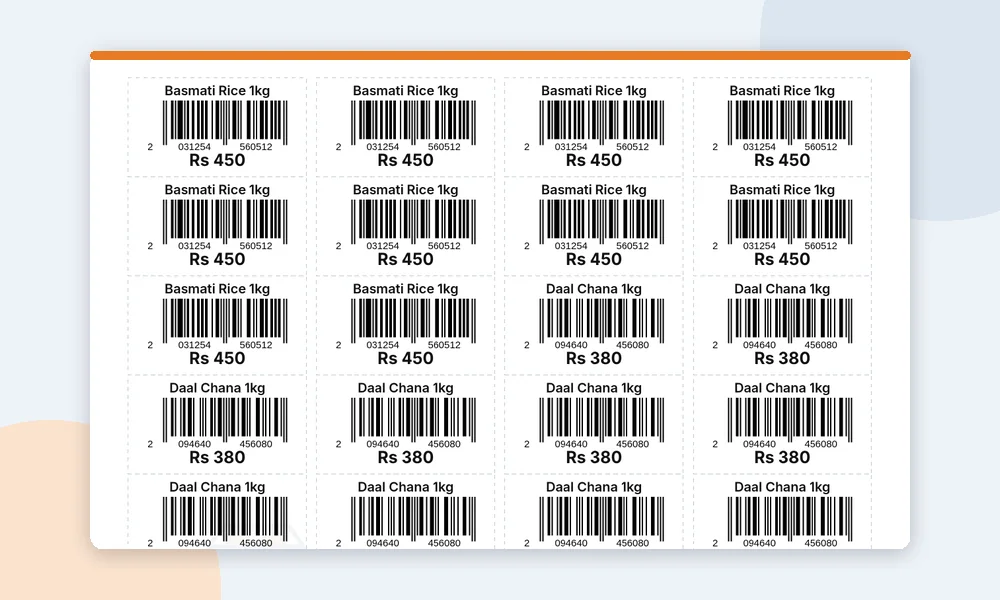
All four formats work with this generator. Pick the one that matches your codes and your scanner.
| Barcode type | What it can hold | Best for |
|---|---|---|
|
Code 128 |
English letters, numbers and symbols |
In-store codes like DP1001, clothing sizes, stationery and parts |
|
EAN-13 |
13 digits (the last one is a check digit) |
Retail-style product codes; in-store codes starting with 20 |
|
UPC-A |
12 digits (the last one is a check digit) |
Shops and scanners set up for the UPC format |
|
QR code |
Text or a web link, including Urdu |
Product details or a WhatsApp link; needs a 2D scanner or phone camera |
Selling your own brand to supermarkets or online marketplaces? You need official GS1 barcodes (GS1 Pakistan codes usually start with 896). Codes from this tool are for use inside your own shop. Our guide Barcode kaise banaye explains the difference.
Any shop that sells items without a usable manufacturer barcode can label them and bill faster.
Loose rice, daal, spices and anything you pack in the shop.
One code for each size and colour, so stock counts stay correct.
Covers, chargers and cables from the wholesale market.
Fittings, tools and parts that come in loose boxes.
Pens, registers and school items sold one by one.
Boxes and packs you prepare in-house, with name and price.
A barcode label saves time only when the counter can read it. With barcode billing in theDukanPOS, you add a product once, print its label and scan it at the counter: the right item and price come up, and stock goes down with each sale, so your inventory stays accurate.
This free generator is ideal for a quick batch of labels. When you label hundreds of items, theDukanPOS keeps codes, prices and stock in one place, from PKR 2,500/month (USD $10/month internationally), with a 15-day free trial.
You will need a barcode scanner at the counter and, for labels, a label printer or A4 sticker sheets. Ask us on WhatsApp which devices suit your shop before you buy anything.
Yes. It is free with no sign-up. The PDF carries a small “Generated with theDukanPOS” footer line and a faint logo in the background.
Code 128, EAN-13, UPC-A and QR codes. For EAN-13 and UPC-A, the check digit is calculated for you.
Yes. Choose 10, 21, 24, 40 or 65 labels per A4 sheet, download the PDF and print at 100% (actual size). Test on plain paper first, because sticker sheets from different brands have slightly different margins.
No. For your own brand in other stores or online marketplaces you need GS1 barcodes from GS1 Pakistan. Codes made here are for use inside your own shop.
Most USB and wireless barcode scanners read Code 128, EAN-13 and UPC-A. QR codes need a 2D scanner or a phone camera. Always scan a test label before printing a full batch.
Yes. Type the name in Urdu and it prints on the label. The barcode itself must use English letters or numbers, but a QR code can hold Urdu text.
No. Everything runs in your browser; nothing is saved or sent.
Yes. theDukanPOS supports barcode billing and label printing for your own products. Try it free for 15 days.
Make an invoice in rupees and save it as PDF.
Monthly instalment, profit and a full payment schedule.
Margin, markup and the selling price you need.
Scan at the counter and print labels for your own items.
Try every feature free for 15 days. Questions? Call or WhatsApp 0312 7032292 and talk to a real person.
