Search for “free POS software Pakistan” and you will find plenty of options: free mobile apps for billing and khata, free desktop programs, open-source systems, cracked copies of paid software and “free forever” plans with paid upgrades. For a small shop watching every rupee, free sounds perfect. Sometimes it is. Often, though, the real cost shows up later in time, lost data or features you end up paying for anyway.
This article is an honest comparison of free and paid POS software for Pakistani shops. We sell a paid POS, so we will be clear about where free tools are genuinely the better choice.
What “free” usually means
Free POS software comes in a few forms, each with its own trade-offs:
- Free apps with paid upgrades (freemium). The basic plan is free, with limits on items, bills, users or features. Upgrading unlocks more.
- Ad-supported apps. Free to use, funded by advertising or by selling other services to users.
- Open-source software. The software is free, but you need someone technical to install, configure, host and maintain it.
- Free trials. Full features for a limited time, then a subscription. This is not free software, but it is a free way to test.
- Cracked or pirated copies. These are illegal, often contain malware, receive no updates and can lose your data. Avoid them completely.
When free POS software is a good choice
Free tools can be the right answer, especially when:
- You are just starting, with a small number of products and little or no udhaar.
- You mainly need a digital khata or simple bills, not stock control.
- You are the only person using it.
- You want to try digital record-keeping before committing money.
If that describes your shop, start with a free tool, or with our free invoice generator and khata template, and upgrade when you outgrow them.
The hidden costs of free
1. Limits that appear as you grow
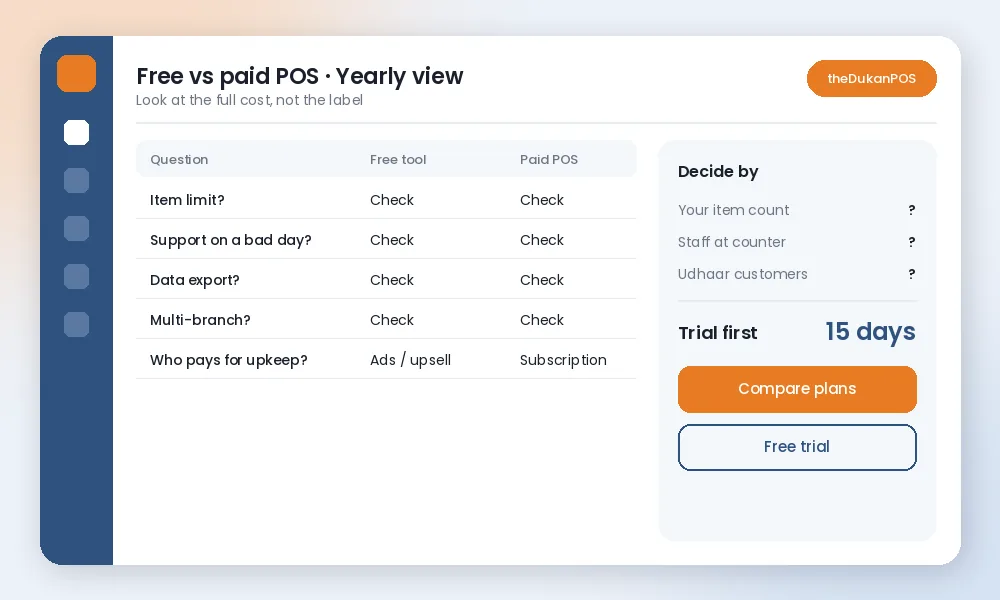
Freemium plans often cap the number of products, bills per month, users or branches. Those limits are fine on day one and frustrating once the shop gets busy. Check them before you enter hundreds of items.
2. Your time
A free tool that lacks barcode labels, low-stock lists or proper reports means more manual work. If it adds half an hour a day, that is fifteen hours a month at the counter or late at night.
3. Support when things go wrong
When billing stops on a busy evening, who do you call? Free tools usually offer limited or no direct support. Paid software normally includes help by phone or WhatsApp. For a shop that depends on fast billing, that support has real value.
4. Data ownership and export
Ask where your data is stored, who can see it, and whether you can export it if you leave. Some free tools make it hard to move your customer balances or product list elsewhere. Your udhaar records and sales history are business assets; make sure you can take them with you.
5. Missing features you end up paying for
Many shops start free, then pay separately for a stock app, a khata app and a reports tool. Several partial tools can cost more and work worse than one complete system.
What you typically get with paid POS
- Complete features in one place: billing, stock, purchases, customer credit, reports.
- Room to grow: more items, users and branches without switching systems.
- Support: a team you can reach when you need help.
- Updates: regular improvements and fixes.
- Accountability: a company that depends on keeping you as a paying customer.
Paid does not automatically mean better. Some paid systems are expensive, complicated, or charge for every add-on. Compare on what you actually need.
An example: two shops, two right answers
Imagine two shops on the same street. The first is a small paan and general items shop run by the owner alone, with around fifty products and almost no credit. A free billing app or even a notebook is perfectly adequate here; paying a monthly fee would add little.
The second is a kiryana store with two staff at the counter, several hundred products, a long udhaar list and a small godown. Here, the owner needs stock levels, low-stock lists, customer balances, staff-wise sales and a daily profit view. Patching this together from free apps is slow and error-prone, and a complete paid system usually pays for itself through fewer stock-outs, fewer forgotten credit entries and less time spent on accounts.
How to compare honestly
Work out what a tool costs over a year, including your time:
- List what you must have: barcode billing, stock levels, udhaar, installments, multi-branch, Urdu interface, mobile access.
- Check each option against that list, including limits on the free plan.
- Add up the yearly price of the paid option, plus any add-ons and hardware.
- Estimate the time each tool saves or costs per day.
- Test your top two choices with real bills for a week.
Questions to ask any POS provider, free or paid
- What are the limits on items, bills, users and branches?
- Can I export my products, customers and balances?
- How do I get help, and how quickly?
- Does it work in Urdu?
- What happens to my data if I stop using it?
- Does it support the way I sell: wholesale rates, credit, installments or bookings?
Where theDukanPOS fits
theDukanPOS is a paid cloud POS, priced from PKR 2,500 per month in Pakistan (USD $10 internationally), with a 15-day free trial so you can test everything before paying. It covers billing, inventory, barcode labels, purchases, khata, installments, multi-branch, reports and a mobile app, with an English and Urdu interface and support on WhatsApp.
To be fair about limits: we do not offer FBR integration, payment gateway integration, offline mode or restaurant features. If you need those, a different system may suit you better. See our pricing or comparisons with other tools.
The bottom line
Free POS software is a good way to start and may be enough for a very small shop. As soon as you have many items, staff at the counter, lots of udhaar or more than one location, the hidden costs of free tools usually outweigh the subscription of a complete system. Whichever you choose, test it with your own shop’s real work before committing, and make sure your data stays yours.
Frequently asked questions
Is there free POS software in Pakistan?
Yes. There are free billing and khata apps, freemium plans and open-source systems. They suit very small shops but often have limits on items, users, features or support.
Is free POS software safe?
Legitimate free apps from known developers can be fine. Avoid cracked or pirated copies of paid software; they are illegal, receive no updates and can contain malware or lose your data.
How much does paid POS software cost in Pakistan?
It varies by provider and features. theDukanPOS starts from PKR 2,500 per month with a 15-day free trial.
Can I move from a free POS to a paid one later?
Usually, if the free tool lets you export your products and customer balances. Check export options before you start.